Add Instructional Team Notes to Your Course Schedule
Schedule Builder is a powerful tool that helps to organize lectures, assignments, live sessions, due dates, and more in your CoursePlus site.
Course instructional teams often use the “Additional Information” field in Schedule Builder events to write course design or production notes when developing or revising a course. This information is meant for faculty teams and Center for Teaching and Learning (CTL) staff only, but is always publicly visible on the course main content page or Syllabus > Schedule page because content in the “Additional Information” field is always displayed on those pages.
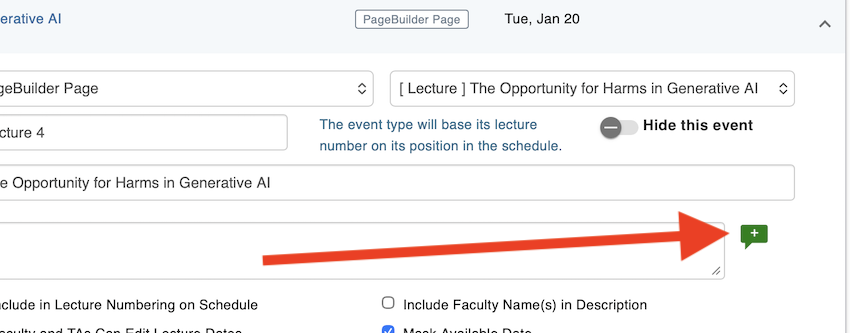
To address this issue, the CoursePlus team has added a new, private field to Schedule Builder events: instructional design notes. This information is visible only inside Schedule Builder, and is thus viewable only by the course instructional team. You can add an instructional design note to any event in Schedule Builder by clicking the green add comment (“+”) icon while adding or editing an event:
When you click the teal “+” bubble, the instructional design notes field appears:
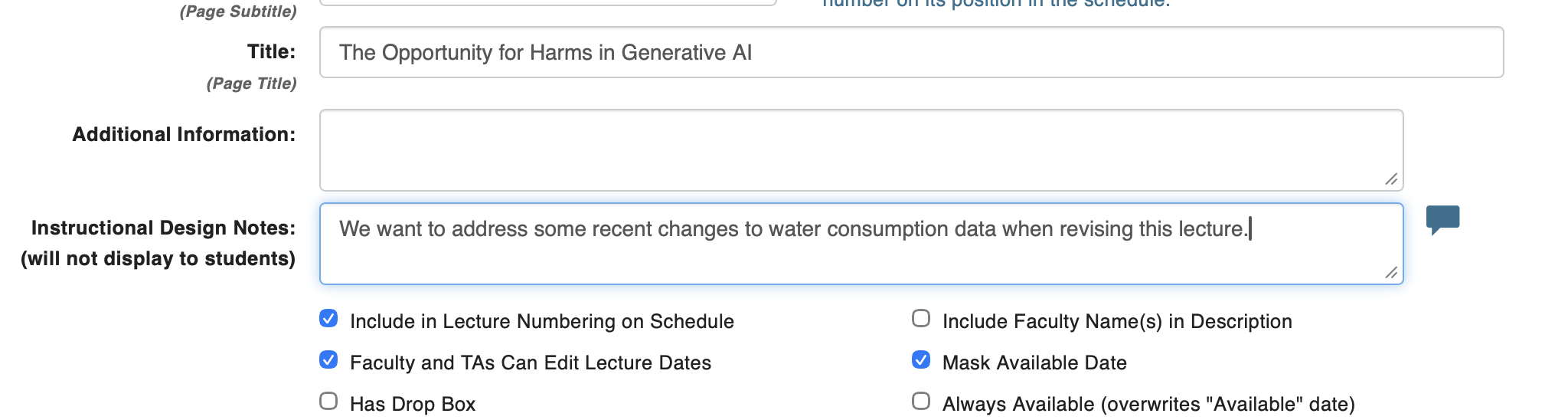
To make it easy to see which events in Schedule Builder have instructional design notes, a teal comment icon is displayed to flag on the main Schedule Builder editing view next to events that have instructional design notes.

Notes can be added and changed as needed, and when notes are removed, the indicator icon also disappears.
We hope that these changes improve the course building and revision process in CoursePlus. As always, if you have questions about this change, please reach out to the CTL Help team, and we will be happy to answer any questions you might have.